
Security Research

Golan Myers
|
|
Reading Time:
5
min
tl;dr
Our team found a way to hijack any extension on Open VSX - the registry behind Cursor, Windsurf, VSCodium and most AI-native IDEs - and push code to every developer running it. The whole attack needs one thing: the maintainer clicks a link.
To put the scale in perspective: the top 10 extensions on Open VSX have a combined 320 million downloads. Compromise any single one of them, and auto-update does the rest. Millions of developer endpoints reached within 24 hours, no further action required.
Here's how that looks from the developer side: A stranger messages you: they built something similar to your extension, ran into a snag, would you mind taking a look? The link goes to open-vsx.org, the registry you publish to every week. Would you click?
If you did - and being helpful is not a flaw - the game was already over. By the time that page loads, a token that never expires has been minted in your name, and your extension auto-updates onto every machine that installed it.
That's the stored XSS our team found, now CVE-2026-13323.
Put it next to Shai-Hulud, and the wave is hard to miss: attackers stopped going after companies and started going after the developers who supply them, because compromising one developer turns their own publishing rights into the delivery mechanism for everyone downstream.
Background - Registry for the AI Era
In our last blog, we covered Extension Resurrection. Today, we’ll cover a different attack, which could have affected the endpoints in your organization in a similar way. We’ll start by giving some background. Open VSX is the extension marketplace that VS Code forks can't live without. VSCodium, Cursor, Windsurf, Antigravity, Kiro, and a growing list of AI-native editors all point their auto-update pipeline at the same open registry. It exists because Microsoft's own Marketplace terms limit usage of it - so the open source ecosystem built its own.
Getting in is trivial by design: one GitHub OAuth login, and you're a publisher. No email verification beyond what GitHub already gives you, no domain proof, no review queue, no rate limit on how many namespaces you can spin up. That openness is the entire point of Open VSX - and it's also exactly what an attacker needs to stand up an identity on the platform in about two minutes.
Open VSX Marks the Spot
Every extension on Open VSX is uploaded in a VSIX package format - essentially just a ZIP archive.
A standard archive contains files specifying the extension’s metadata, files defining the types of files the archive includes, and content files - essentially the core extension logic and supporting assets.
Open VSX exposes functionality which allows anyone to view contents of files extracted from uploaded extensions’ archives at a predictable path: open-vsx.org/vscode/unpkg/{namespace}/{extension}/{version}/{path-in-archive}.
We observed that when publishing an extension with an archive containing an html file, the endpoint served it back with the Content-Type: text/html header, and without Content-Security-Policy, X-Content-Type-Options: nosniff and Content-Disposition: attachment. Here’s a quick breakdown of each of the headers and their purpose:
Content-Type Tells the browser what type of content is being served (HTML, JavaScript, JSON, image, etc.).
text/htmlinstructs the browser to render the response as a web page, making it executable HTML rather than plain text or data.Content-Security-Policy (CSP) Defines which sources of scripts, styles, images, and other resources the browser is allowed to load and execute. It is a key defense against XSS and other content injection attacks.
X-Content-Type-Options Prevents browsers from guessing a file's MIME type.
nosniffforces the browser to trust the declaredContent-Type, reducing the risk of executing content as a different type (e.g., treating a text file as JavaScript).Content-Disposition Controls how the browser handles the response (display inline or download).
attachmenttells the browser to download the file instead of rendering it, which helps prevent unintended execution of potentially dangerous content such as HTML.
The combination of an HTML response with the headers configured in such a way caused the browser to render the page, and using HTML <script> tags, run the code within it. On open-vsx.org. With full access to any pre-existing session.
At this point, we were looking at a stored XSS vulnerability - now tracked as CVE-2026-13323 - turning Open VSX’s own file server into a script distribution mechanism.
It's worth noting that while sifting through Open VSX’s file-serving paths, we found a related - though less severe - issue tracked as CVE-2026-4983. This allowed an attacker to achieve stored XSS by uploading an extension with a malicious SVG icon. On the main open-vsx.org, the impact is limited to enabling phishing attacks and credential harvesting through attacker-crafted pages, as the code execution occurs on the S3-backed CDN. However, on private deployments of the Open VSX application using local storage, the impact is similar to that of the first issue described - as we will show below.
One Click, One PAT, One Supply Chain
Not all XSSs were born equal - an XSS on a CDN is nice, but its impact is very limited. An XSS on a marketplace, though, is a different ball game. An XSS on a marketplace that serves millions of users through IDEs with a default auto-update configuration for extensions is the next supply-chain disaster waiting to happen.
Here's the chain we built end-to-end - no developers were harmed in the creation of this PoC; we kept the chain entirely contained within the “victim browser”, and upon successfully proving the impact, we immediately removed the PoC extension. We registered a disposable publisher account, packaged a "utility" extension with an HTML payload buried inside it, and published it - the entire flow requires no review. That gave us a live URL on the real open-vsx.org domain. We then browsed to the URL and observed the result. An attacker would instead identify a maintainer for an extension with a large install base, and reach out with a plausible pretext, such as a "compatibility report" worth a quick look, linking to the URL.
The moment that publisher - already logged into Open VSX in their browser - would click the link, the page would execute in their authenticated session. From there, the script wouldn’t need to guess at anything: it would call the same REST API the publisher's own browser would call, confirm their identity, pull a CSRF token from Open VSX's dedicated /user/csrf endpoint, and mint a brand-new Personal Access Token in their name. The following PoC video shows exactly that flow:
That token is the whole game. It doesn't expire when the session cookie does (or at all for that matter - the attacker can configure this as part of the script logic), it survives a password change, and most publishers never think to check their account settings for a token they didn't create. With it in hand, an attacker can act as that publisher indefinitely - including publishing a new version of their most-installed extension. Yes, the extension that will be auto-updated on most developer endpoints, acting as a rather efficient malware delivery system.
Anatomy of the Attack
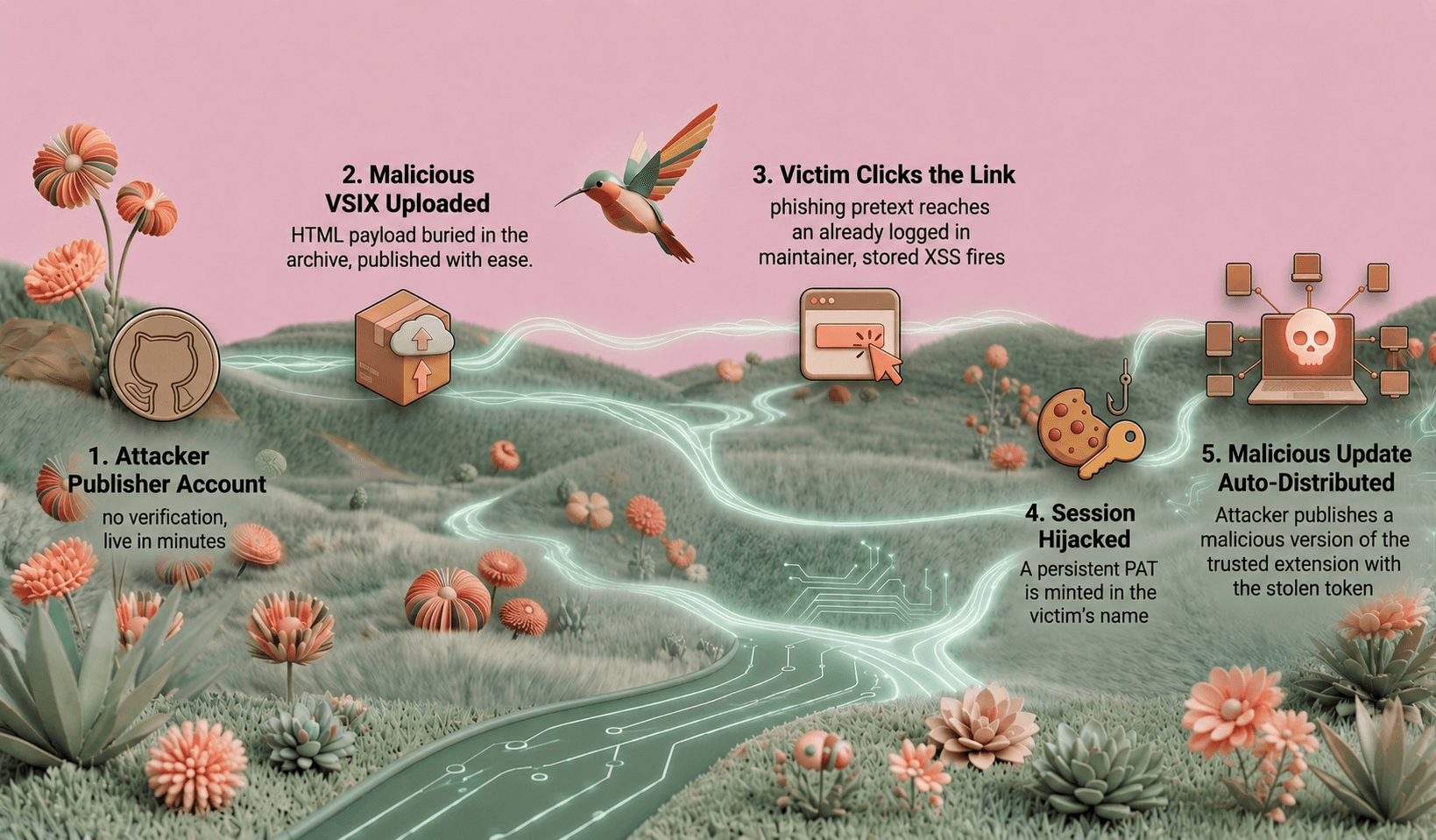
The full chain runs in five stages:
1. Publish the payload. The attacker registers a publisher account and uploads a "utility" extension with an HTML file buried in the VSIX. No review, no verification, live in minutes.
2. The registry serves it as code. /vscode/unpkg/ returns that HTML from open-vsx.org's own origin, with an executable content type and none of the isolating headers — so the browser renders and runs it.
3. Deliver the link. The attacker sends the open-vsx.org URL to the maintainer of a widely-installed extension, under a pretext like a compatibility report.
4. Mint the token. The maintainer clicks while logged in. The script executes in their authenticated session and calls the same REST API their own browser would, minting a persistent Personal Access Token in their name:
Three same-origin fetches, no user interaction after the initial click, and the attacker walks away with a long-lived credential that outlives the victim's session.
5. Ship to everyone. With the PAT, publishing a new version of the maintainer's most-installed extension is a single API call. Auto-update carries it to millions of endpoints within 24 hours.
To put this into perspective, the top 10 extensions on Open VSX boast a combined ~320 million downloads. Compromise any single one of them, and you reach millions of developer endpoints within 24 hours due to the “auto-update” default for extensions on most VS Code forks.
Why it worked - three conditions stacked:
Open, unverified publisher registration: anyone becomes a namespace owner in minutes. Intentional, and not a flaw on its own - but it lets an attacker stand up an identity at will.
Executable file serving on the registry's own origin: uploaded files come back with browser-executable content types and no isolating headers.
A same-origin, cookie-authenticated API next door: the victim's cookie rides along automatically, so session hijack becomes API abuse with no extra work.
Strategic Implications for the community
For Organizations
Your engineers likely use an IDE with extensions pulled from Open VSX, VS Code Marketplace, or JetBrains Plugins Marketplace. Upon installation, unless explicitly disabled, the auto-update functionality means you are trusting every extension's update channel as much as you trust the extension itself at install time. Auto-update should not be treated as a "set and forget" convenience for extensions with elevated filesystem or network access.
Every security team must ensure visibility into installed software such as applications (IDEs) and extensions. However, that is not enough - organizations must also be able to see and control application configurations such as extension allowlists and auto-update configuration status per extension. Visibility and control over what’s installed is only half the story. To complete it, we also need to know how the installed software is configured. Continuously.
For Developers and Publishers
Treat every link, regardless of how trustworthy you know the domain to be, with the same suspicion you'd apply to a phishing email - because that's exactly what it is. Periodically audit your extensions, as they’ve likely changed since initial installation. Periodically verify and rotate your account's tokens; a PAT you didn't generate is the only visible trace this attack leaves behind.
Responsible Disclosure
We reported CVE-2026-13323 to the Eclipse Foundation security team on May 21, 2026. A fix shipped in Open VSX 1.0.2 during the week of June 23, 2026, and the CVE was published on July 1, 2026. The second, less severe CVE-2026-4983, was discovered during the same research effort and similarly disclosed.
We would like to point out the professionalism of the team, which was very responsive and acted hastily to ensure the security of its users.